


• Login
  • Home
  • Why BuildCentrix?
    • Features
    • REVIT, CAD & CAM Integration
    • Ducting & HVAC
    • Piping
    • Production Management
    • Accounting Integration
    • Reporting & Analytics
    • Integrated Timecards
    • Tool & Asset Tracking
  • Free Trial
    • Book an online demo
  • Pricing
  • Customer Support
    • Product Support
    • Support Video Library
    • Contact Us
    • Pay an Invoice
    • Terms of Service
    • Privacy Policy
  • News & Updates
    • Release Radar
    • BCX Video Library
    • News
    • Testimonials
    • E-News Subscription

Call us today! 1-250-802-9599

[email protected]
LOG IN
Software for HVAC, Pipe and Construction Companies | BuildCentrixSoftware for HVAC, Pipe and Construction Companies | BuildCentrix
  • Login
  • Home
  • Why BuildCentrix?
    • Features
    • REVIT, CAD & CAM Integration
    • Ducting & HVAC
    • Piping
    • Production Management
    • Accounting Integration
    • Reporting & Analytics
    • Integrated Timecards
    • Tool & Asset Tracking
  • Free Trial
    • Book an online demo
  • Pricing
  • Customer Support
    • Product Support
    • Support Video Library
    • Contact Us
    • Pay an Invoice
    • Terms of Service
    • Privacy Policy
  • News & Updates
    • Release Radar
    • BCX Video Library
    • News
    • Testimonials
    • E-News Subscription

Did you know BCX Administrators can easily manage User access and permissions?

Home » Did you know BCX Administrators can easily manage User access and permissions?

Did you know BCX Administrators can easily manage User access and permissions?

June 16, 2026 Bits and Bytes, News

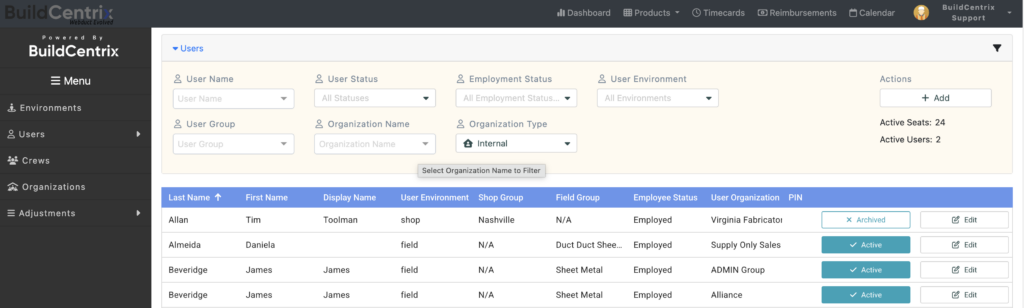
When it comes to managing Users within the BCX platform, Administrators can easily activate and deactivate access and other functionality. For instance, Administrators can set and restrict User permissions to various services, such as ordering, timecards, and 3D takeoffs. If you have Administrator access and would like to manage your own Users, follow these quick steps:

  1. Log into BuildCentrix.
  2. Locate the menu in the upper right corner of your screen.
  3. Choose Users from the drop-down menu.
  4. Use the User name (or any other filter) to find the User you need to update.
  5. To Re-activate or Deactivate, simply click the appropriate button.
  6. To add a new User, simply click the Add button.
  7. Click Edit to modify any User’s information, including re-setting their password.

If you would like more information on User management or any other aspect of the BuildCentrix platform, please email [email protected]
Tags: News
Share

Contact Us

  • BuildCentrix - PERMANENT SOFTWARE GROUP CANADA LTD.
  • PO Box 57751, STN A, Toronto, Ontario M5W 5M5
  • (250) 802-9599
  • support@buildcentrix.com

Posts by Tag

3D 3D Blueprint Takeoffs 3D Modeling 3D Takeoffs Air Ducts API Autodesk BCX 3D Assembly Builder BIM BuildCentrix Construction Management Software | BuildCentrix Building Information Modeling CAD CAM integration Cloud cloud-native Construction Construction Industry Construction Innovation Construction Technology Digital Construction Fabrication HVAC Labor Labour Lean Construction Model Spooling News Newsletter Piping Piping Plumbing 3D Plumbing Production & Delivery Production Management Productivity Project Reporting Real-Time Data Release Radar Revit Model SaaS shipping Smart Technologies Standardized Workflow Technology Timecard Workflow

Find us on

Latest Posts

  • Construction in the Cloud Vol 7 / No 3 is now online
  • Did you know BCX Administrators can easily manage User access and permissions?
  • Did you know you can print your Delivery lists?
  • Workflow Changes for Blueprint Projects
  • SMACNA Fab Forum Wrap-Up
  • See us at the 2026 SMACNA Fab Forum

Contact Us

Got a question? Fill out this form and we'll get back to you asap.

Send Message
Let's get started Book My Free Trial Now!

Integrate - Fabricate - Automate

Get started today.

Contact Info

  • BuildCentrix - PERMANENT SOFTWARE GROUP CANADA LTD.
  • PO Box 57751, STN A, Toronto, Ontario M5W 5M5
  • (250) 802-9599
  • support@buildcentrix.com
  • www.buildcentrix.com

Latest Posts

  • Construction in the Cloud Vol 7 / No 3 is now online
  • Did you know BCX Administrators can easily manage User access and permissions?
  • Did you know you can print your Delivery lists?
  • Workflow Changes for Blueprint Projects

© [2007 - 2026] — BuildCentrix - PERMANENT SOFTWARE GROUP CANADA LTD.

  • Home
  • About
  • Contact
Prev Next